> ## Documentation Index
> Fetch the complete documentation index at: https://docs.meteroid.com/llms.txt
> Use this file to discover all available pages before exploring further.
# Express Accounts
> Onboard your users to Meteroid billing with a guided, platform-branded setup flow.
# Express Accounts
Express accounts let platforms onboard users who don't yet have a Meteroid account and who should not manage their billing entities directly. You create a connected account on their behalf, send them an onboarding link, and they complete a short setup wizard — all within a platform-branded experience.
Meteroid handles organization creation, tenant provisioning, and invoicing entity setup automatically. Once onboarding completes, you can make API calls on behalf of the connected account using your own API key and the `x-meteroid-connect-account` header.
Express accounts are ideal for platforms where end users should not need to understand Meteroid internals. For users who already have a Meteroid account and want to connect it themselves, see [Standard Accounts (OAuth)](/connect/oauth).
## Express vs. Standard
| | Express | Standard |
| ------------------------------ | ------------------------------------------- | ------------------------------------------------ |
| **Initiated by** | Platform | End user |
| **User has Meteroid account?** | Not required — created during onboarding | Yes — user connects their existing org |
| **Connection flow** | Onboarding link → branded wizard | OAuth consent screen |
| **Platform control** | User is readonly, platform has full control | User has full access, platform has scoped access |
## Getting Started
### 1. Enable Connect
Navigate to **Developers > Connect Platform** in your Meteroid dashboard, then click **Enable Platform**. This activates the Connect feature for your organization.
### 2. Configure Branding (Optional)
In the **Platform Settings** tab, you can set a branding invoicing entity. The onboarding wizard will display your company logo and name in its sidebar, giving end users a branded experience.
### 3. Create a Connected Account
From the **Connected Accounts** tab, create a new Express account by providing the end user's email and organization name. You can optionally pre-fill a country and attach metadata for your own reference.
Meteroid generates a single-use onboarding link that you send to the user — via email, in-app notification, or any channel you prefer.
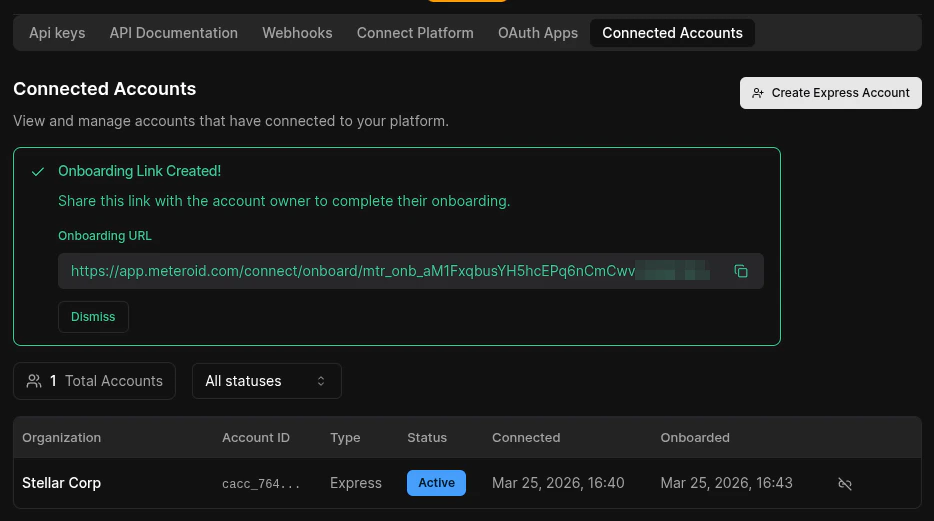 You can also create connected accounts and generate onboarding links programmatically via the API. See the [API Reference](/api-reference) for details.
## The Onboarding Wizard
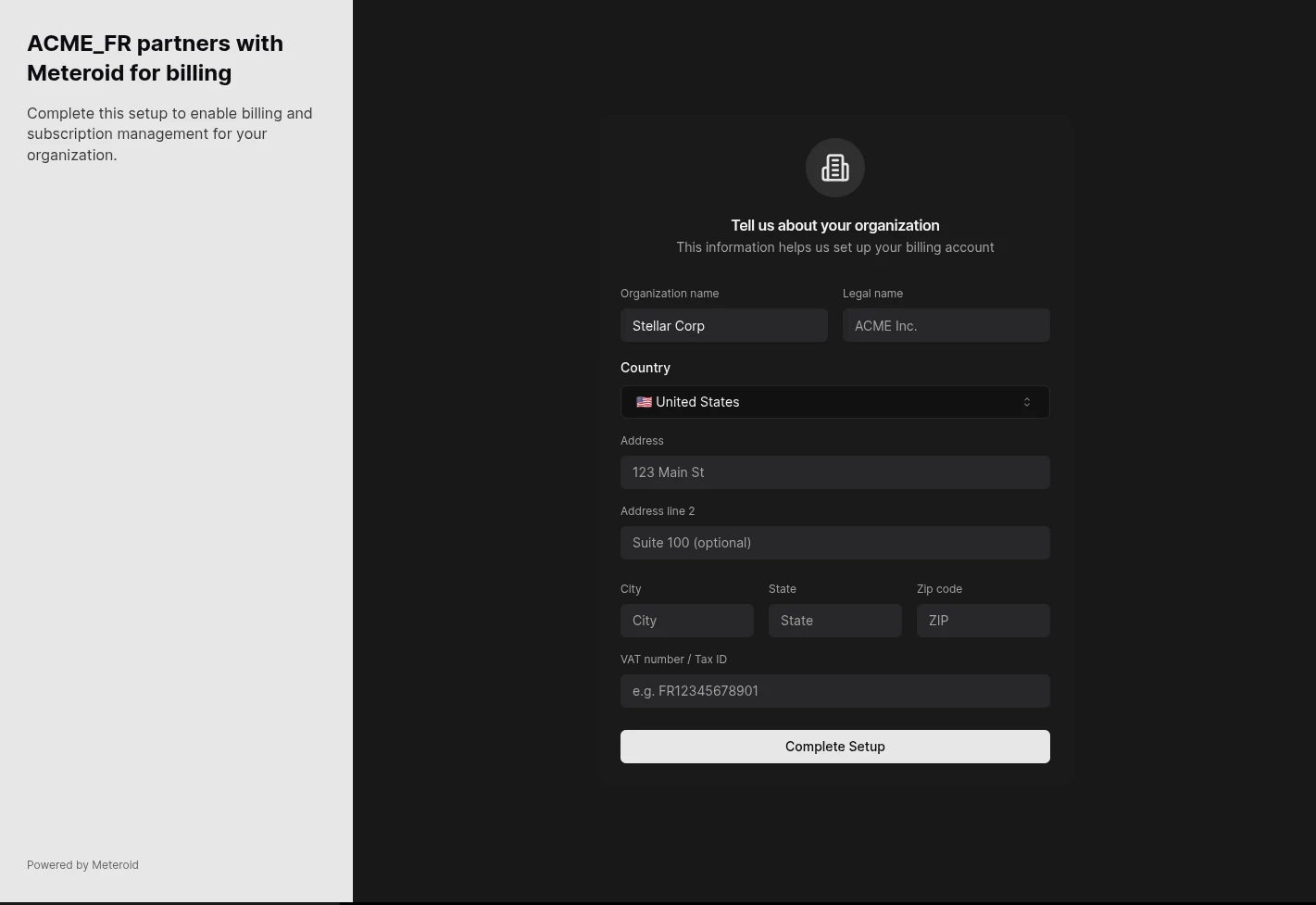
When the user opens the onboarding link, they see a guided wizard with your platform branding.
### Step 1 — Authentication
* If the user already has a Meteroid account, they sign in with their existing credentials.
* If not, they enter their email, receive a verification link, and set a password to create a new account.
### Step 2 — Business Information
The user reviews and completes their organization details:
* **Organization name** — pre-filled from what the platform provided, editable by the user
* **Country** — pre-filled if the platform specified one
* **Legal name**, **address**, **VAT number** — optional fields used for invoicing
You can also create connected accounts and generate onboarding links programmatically via the API. See the [API Reference](/api-reference) for details.
## The Onboarding Wizard
When the user opens the onboarding link, they see a guided wizard with your platform branding.
### Step 1 — Authentication
* If the user already has a Meteroid account, they sign in with their existing credentials.
* If not, they enter their email, receive a verification link, and set a password to create a new account.
### Step 2 — Business Information
The user reviews and completes their organization details:
* **Organization name** — pre-filled from what the platform provided, editable by the user
* **Country** — pre-filled if the platform specified one
* **Legal name**, **address**, **VAT number** — optional fields used for invoicing
 ### Completion
On submission, Meteroid automatically:
1. Creates a new organization and production tenant for the user
2. Sets up an invoicing entity with the billing details provided
3. Marks the connected account as **Active**
4. Redirects the user back to the platform's specified redirect URL
## Onboarding Links
Onboarding links are **single-use** and **time-limited** (7 days by default). Once the user completes onboarding, the link cannot be reused.
If a link expires or you need to resend, you can generate a new one from the Connected Accounts tab or via the API — without creating a new connected account.
## Account Lifecycle
A connected account moves through a series of states:
| Status | Description |
| ------------- | ------------------------------------------------------------------------------------------------------------------------------------------------------------------- |
| **Pending** | Account created, waiting for the user to complete the onboarding wizard. |
| **Active** | Onboarding complete. Organization and tenant are provisioned. You can now make API calls on behalf of this account. |
| **Suspended** | Temporarily disabled by the platform. API calls on behalf of this account are rejected. |
| **Revoked** | Permanently disconnected. All associated tokens are invalidated. Existing billing data is preserved, but no new operations can be performed through the connection. |
## Acting on Behalf of a Connected Account
Once an account is **Active**, you can make API calls scoped to the connected organization by passing the `x-meteroid-connect-account` header with your own API key — similar to Stripe's `Stripe-Account` header.
```
Authorization: Bearer
x-meteroid-connect-account: cacc_xxxxxxxx
```
All standard API endpoints work with this header. Meteroid resolves the request to the connected organization's tenant context, so you can create customers, manage subscriptions, generate invoices, and more — as if you were acting from within their account.
The connected account must be **Active**. Requests targeting Pending, Suspended, or Revoked accounts are rejected.
### Completion
On submission, Meteroid automatically:
1. Creates a new organization and production tenant for the user
2. Sets up an invoicing entity with the billing details provided
3. Marks the connected account as **Active**
4. Redirects the user back to the platform's specified redirect URL
## Onboarding Links
Onboarding links are **single-use** and **time-limited** (7 days by default). Once the user completes onboarding, the link cannot be reused.
If a link expires or you need to resend, you can generate a new one from the Connected Accounts tab or via the API — without creating a new connected account.
## Account Lifecycle
A connected account moves through a series of states:
| Status | Description |
| ------------- | ------------------------------------------------------------------------------------------------------------------------------------------------------------------- |
| **Pending** | Account created, waiting for the user to complete the onboarding wizard. |
| **Active** | Onboarding complete. Organization and tenant are provisioned. You can now make API calls on behalf of this account. |
| **Suspended** | Temporarily disabled by the platform. API calls on behalf of this account are rejected. |
| **Revoked** | Permanently disconnected. All associated tokens are invalidated. Existing billing data is preserved, but no new operations can be performed through the connection. |
## Acting on Behalf of a Connected Account
Once an account is **Active**, you can make API calls scoped to the connected organization by passing the `x-meteroid-connect-account` header with your own API key — similar to Stripe's `Stripe-Account` header.
```
Authorization: Bearer
x-meteroid-connect-account: cacc_xxxxxxxx
```
All standard API endpoints work with this header. Meteroid resolves the request to the connected organization's tenant context, so you can create customers, manage subscriptions, generate invoices, and more — as if you were acting from within their account.
The connected account must be **Active**. Requests targeting Pending, Suspended, or Revoked accounts are rejected.