> ## Documentation Index
> Fetch the complete documentation index at: https://docs.meteroid.com/llms.txt
> Use this file to discover all available pages before exploring further.
# Tenants
Meteroid allows you to manage multiple environments through Tenants. To create a new Tenant, click Tenant (upper left) > New Tenant.
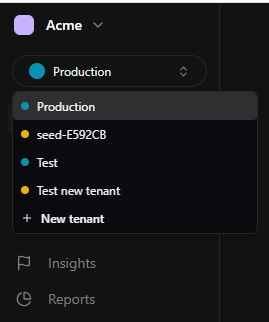 When creating a Tenant, you can choose from three types of environments:
* **Production** – Your live environment, connected to real Customers and payment providers.
* **Development** – A test environment to simulate your setup.
You cannot connect a Stripe account in Development mode.
* **Sandbox** – A pre-filled demo environment with fake data, ideal to explore how Meteroid works.
In **Settings > General**, you can further personalize each Tenant’s settings:
* **Company Trade Name** – This name is used within the Platform but does not appear on invoices. To update invoice details, go to Settings > Merchant.
* **Tenant Name** – You can modify this field as needed. To create a new tenant, go to **Tenant > New Tenant** (upper left).
* **Tenant Slug** – Customize the tenant slug name. Different tenant types (e.g., Production, Staging, Development, QA) can be created for various use cases.
💡 Only changes in Production Tenants affect End Users and financial transactions.
* **Reporting Currency** – This currency is used exclusively for reporting and dashboards presented in the Reports section. It does not affect Plans & Invoices.
📌 Note: Only Customers are shared across Tenants. All other data (Plans, Subscriptions, Metrics, Invoices, etc.) is Tenant-specific and cannot be accessed across environments.
When creating a Tenant, you can choose from three types of environments:
* **Production** – Your live environment, connected to real Customers and payment providers.
* **Development** – A test environment to simulate your setup.
You cannot connect a Stripe account in Development mode.
* **Sandbox** – A pre-filled demo environment with fake data, ideal to explore how Meteroid works.
In **Settings > General**, you can further personalize each Tenant’s settings:
* **Company Trade Name** – This name is used within the Platform but does not appear on invoices. To update invoice details, go to Settings > Merchant.
* **Tenant Name** – You can modify this field as needed. To create a new tenant, go to **Tenant > New Tenant** (upper left).
* **Tenant Slug** – Customize the tenant slug name. Different tenant types (e.g., Production, Staging, Development, QA) can be created for various use cases.
💡 Only changes in Production Tenants affect End Users and financial transactions.
* **Reporting Currency** – This currency is used exclusively for reporting and dashboards presented in the Reports section. It does not affect Plans & Invoices.
📌 Note: Only Customers are shared across Tenants. All other data (Plans, Subscriptions, Metrics, Invoices, etc.) is Tenant-specific and cannot be accessed across environments.