

- A method — how tax is calculated for this entity.
- Tax categories — what you sell, classified for tax purposes.
- Custom rates — the rates that apply to a category, by customer location.
Tax calculation method
Under Settings > Taxes > Tax calculation, pick a Method:- No tax — nothing is taxed. Custom rates and customer tax status are ignored entirely.
- Manual — custom rates only — there is no calculated VAT. Each line uses the customer’s own flat rate, or a matching custom rate; otherwise it is untaxed.
- Automatic EU VAT — Meteroid computes VAT by scenario (your domestic rate, reverse charge for intra-EU B2B, the customer’s country rate for intra-EU B2C, zero-rating for exports).
- Default product tax category — used for invoice lines whose product has no tax category set.
- Require a valid tax ID for reverse charge — when on, reverse charge is applied only after the customer’s VAT number passes VIES. Until it does, the customer’s country standard rate applies. When off, a correctly formatted VAT number is enough.
How tax is decided
The method is the gate. When it is No tax, nothing is taxed. Otherwise every invoice line is resolved in the order below, and the first match wins:- The customer is exempt or reverse-charged. The customer’s tax status wins first — a tax-exempt customer is untaxed, and intra-EU B2B reverse charge shifts the liability to them (validated by VIES when required).
- The product’s tax category is Non-taxable. Lines whose category is Non-taxable carry no tax, whatever the method or custom rates say.
- A custom rate matches the category and country. A custom rate targeting the line’s tax category, with a rule matching the customer’s destination country, applies to that line. Under Automatic EU VAT it replaces the calculated VAT; under Manual it sets the tax.
- Otherwise, the method decides. Manual — the customer’s own flat rate applies, otherwise the line is untaxed. Automatic EU VAT — the engine computes the statutory rate for the scenario.
Tax categories
A tax category classifies what you sell, independently of any specific tax provider. Manage them under Settings > Taxes > Tax categories. Meteroid ships three built-in categories:
You can add your own categories on top (for example Streaming services, or Training), optionally nested under a parent category. Built-in categories are marked Built-in in the table and cannot be deleted; your own show as Custom.
Assigning a category to a product
Open Product Catalog > Products, select a product, and set Tax category in the detail panel. Leaving it on Entity default means the line falls back to the invoicing entity’s Default product tax category. If neither is set, the line is unclassified and the method alone decides its tax.Custom rates
Under Settings > Taxes, the section is called Custom rates under the Manual method and Overrides under Automatic EU VAT — same mechanism, different consequence:- Under Manual, a custom rate defines the tax for a category, since there is no calculated VAT to replace.
- Under Automatic EU VAT, a custom rate replaces the VAT Meteroid calculated for that line.
- Name — as it appears on the invoice, e.g. French VAT, US sales tax.
- Applies to — the tax category this rate targets. It then applies to every line whose resolved category matches, rather than being wired product by product.
- Rate by customer location — one or more rules, each with a customer country (or any country), an optional region, and a percentage. The most specific matching rule wins: region beats country, country beats a rule with neither.
- Accounting code — the reporting code carried onto the invoice’s tax breakdown, e.g.
VAT_FR,SALES_US. It must be unique within your tenant.
Customer tax status
Set on each Customer record, under Customers > Tax information (see Managing customers). Tax status is one of:- Taxable — normal taxation. This is the default.
- Exempt — no tax applies on any line.
- Reverse charge — the buyer accounts for the tax. This is an explicit choice, and it is additive to the intra-EU B2B reverse charge Meteroid already derives from the VAT number.
Automatic EU VAT in detail
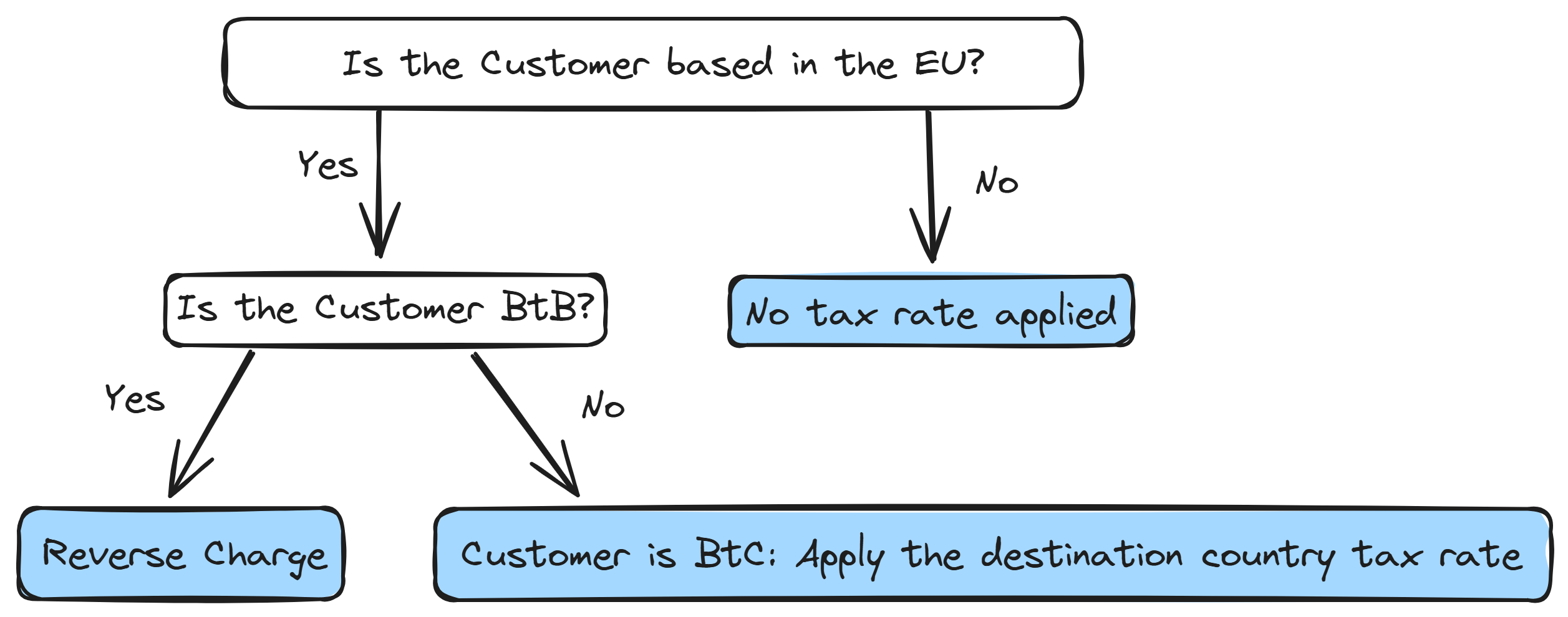
When the method is Automatic EU VAT, Meteroid resolves the statutory scenario from the seller’s country, the customer’s country, and whether the customer is a business:- A customer is treated as a business (B2B) when they carry a VAT number that passes format validation — and, if Require a valid tax ID for reverse charge is on, VIES validation as well. Without a VAT number, the customer is B2C.
- Domestic supplies take your own country’s rate.
- Intra-EU B2B supplies are reverse-charged.
- Intra-EU B2C supplies take the customer’s country rate, subject to the EU distance-selling threshold.
- Supplies outside your VAT territory are zero-rated as exports, and carry the corresponding legal mention.
Legal tax mentions on documents
When a document carries no tax — because of reverse charge, an exemption, or a cross-border export — Meteroid prints the corresponding statutory mention automatically. You don’t configure these. The mention is selected from the seller’s tax jurisdiction and worded in the document’s language (see Invoice language). Examples of what is generated:- Reverse charge — “VAT to be accounted for by the customer (Article 196 of Directive 2006/112/EC).”
- Export, B2B — for a French seller, “Article 259-1° of the French General Tax Code (CGI): supply of services to a taxable person established outside the European Union (Article 44 of Directive 2006/112/EC).”
- Export, B2C — a different provision is cited, because it is a different rule.
- Exemption — the headline plus the customer’s own Exemption reason.